College Football 27 launches with one of the biggest overhauls to defense ever. There are a ton of new coaching adjustments with very specific football terminology that you’ll either need to already know or quickly learn.
Our goal with this guide is to help you understand what each adjustment does and when to use it.
You can make these adjustments in the pre-play normal coach adjustments menu on defense (where you’d go to turn auto flip off or set your zone drops). Or alternatively, you can set these up as one of your 10 defensive custom adjustments (or macros) that are also new to CFB 27.
The biggest recommendation I can give you is to truly understand what each adjustment means before calling it in a game that is meaningful to you.
As an example, you will want to know how setting your Cover 4 Palms check to Point Triangle will play differently than setting it to Bingo against a Bunch formation.
If you take the time to learn these and know what you are doing, these adjustments are incredibly powerful. If you decide to wing it, you’ll give up 1 play touchdowns and have no idea what happened.
Let’s start with a quick reference you can use when you don’t have time to read through every single setting.
Quick Reference
A lot of the settings below reuse the same concepts. Once you know the building blocks, the whole menu gets easier to read:
- Conservative / Balanced / Aggressive: the core risk-reward slider on the General tab.
- Zone It: any matching check set to Zone It abandons match rules and plays pure spot-drop zone.
- Combo: in a stack, the deep/back defender takes the front receiver and the underneath/inside defender takes the back receiver, flipping the natural assignment.
- Box: divides four defenders into quadrants around a bunch (deep-out, deep-in, flat, short-in).
- Bingo: Box rules, but the outside corner locks man-to-man if #1 stays outside.
- Triangle / Point Triangle: a 3-over-2 or 4-over-3 bracket on stacks and bunches, with a safety reading the deeper route.
- Stubbie: the trips-side check where the corner locks #1 man and the nickel/safety/underneath share #2 and #3.
- Solo / Solo Cut: the single-receiver-side check, deciding whether the corner or the safety takes the isolated receiver and who is freed up to help.
General
These are your top-level, gameplan-wide defensive controls that haven’t really changed this year.
Auto Flip Defensive Play Call — On / Off When On, the CPU flips your defensive play to best match the offensive formation.
Cornerback Matchups — Balanced / Overall / By Depth Chart
- Overall: your highest-rated cornerback matches up against the offense’s highest-rated receiver.
- By Depth Chart: matchups are based on each cornerback’s depth-chart position versus the receiver’s overall rating.
Defensive Motion Response — Default / Disabled
- Disabled: your zone defense will not re-align in response to offensive motion.
Defender Aggression — Balanced / Conservative / Aggressive
- Balanced: standard gameplay conditions apply.
- Aggressive: PRO, more defensive move wins with effort. CON, higher stamina cost for moves.
Gap Integrity — Balanced / Conservative / Aggressive
- Conservative: PRO, more focus on protecting your gap. CON, less focus on making big plays.
- Aggressive: PRO, more focus on making big plays. CON, less focus on protecting your gap.
Option Read Key — Balanced / Conservative / Aggressive
- Conservative: PRO, focus on the QB on the option. CON, the dive is left open.
- Aggressive: PRO, focus on the dive on the option. CON, the QB is left open.
Option Pitch Key — Balanced / Conservative / Aggressive
- Conservative: PRO, focus on the QB on the option. CON, the pitch is left open.
- Aggressive: PRO, focus on the pitch on the option. CON, the QB is left open.
RPO Read Key — Balanced / Conservative / Aggressive
- Conservative: PRO, focus on the QB on the option. CON, the dive is left open.
- Aggressive: PRO, focus on the dive on the option. CON, the QB is left open.
RPO Pass Key — Balanced / Conservative / Aggressive
- Conservative: PRO, focus on pass coverage. CON, the run gap is left open.
- Aggressive: PRO, focus on stopping the run. CON, pass coverage is left open.
Strip Ball — Balanced / Conservative / Aggressive
- Conservative: PRO, lower break-tackle chances. CON, the AI will not attempt to strip.
- Aggressive: PRO, higher chance for the AI to attempt a strip for a higher fumble chance. CON, higher chance of a broken tackle.
Tackling — Balanced / Conservative / Aggressive
- Conservative: PRO, AI defenders tackle conservatively. CON, increases the chance of allowing yards after contact.
- Aggressive: PRO, AI defenders attempt Hit Stick tackles for a higher fumble chance. CON, higher chance of broken tackles and fakeouts.
Cornerback Depth — Press / Default / numeric (yards off the line)
- Press: cornerbacks line up right at the line of scrimmage, jamming receivers at the snap.
- Default: cornerbacks align at their default depth off the line.
- Numeric: cornerbacks align the set number of yards off the line (for example, “5” aligns them 5 yards off).
Cornerback Width — Tight / Default / Wide
- Tight: cornerbacks shift inside, closer to the formation. Better for stopping inside routes.
- Default: cornerbacks align at their standard width relative to their receiver.
- Wide: cornerbacks shift outside, further from the formation. Better for stopping outside routes.
Safety Depth — Default / numeric (up to 32 yards off the line) Safeties align the set number of yards off the line.
Safety Width — Pinch / Default / Spread / Wide
- Pinch: safeties pinch inside, closer together. Better for protecting the middle of the field.
- Default: safeties align at their standard width.
- Spread: safeties spread apart somewhat. Balanced between middle and outside coverage.
- Wide: safeties split wide, closer to the sidelines. Better for protecting outside routes.
Safety Midpoint — Default / Left / Right / Strong / Weak
- Default: safeties use their standard alignment midpoint.
- Left / Right: safeties shift their alignment toward the left or right hash.
- Strong: safeties shift toward the passing strength (the side with more receivers).
- Weak: safeties shift away from the passing strength (toward the side with fewer receivers).
Ballhawk — Conservative / Aggressive
- Conservative: assists defenders to a safe catch location, avoiding collisions with opponents.
- Aggressive: assists defenders to the most aggressive catch location, even at the risk of colliding with opponents.
Coverage Strategy
These settings control zone depth, the Plaster mechanic, Roll coverage, and manual zone-drop overrides.
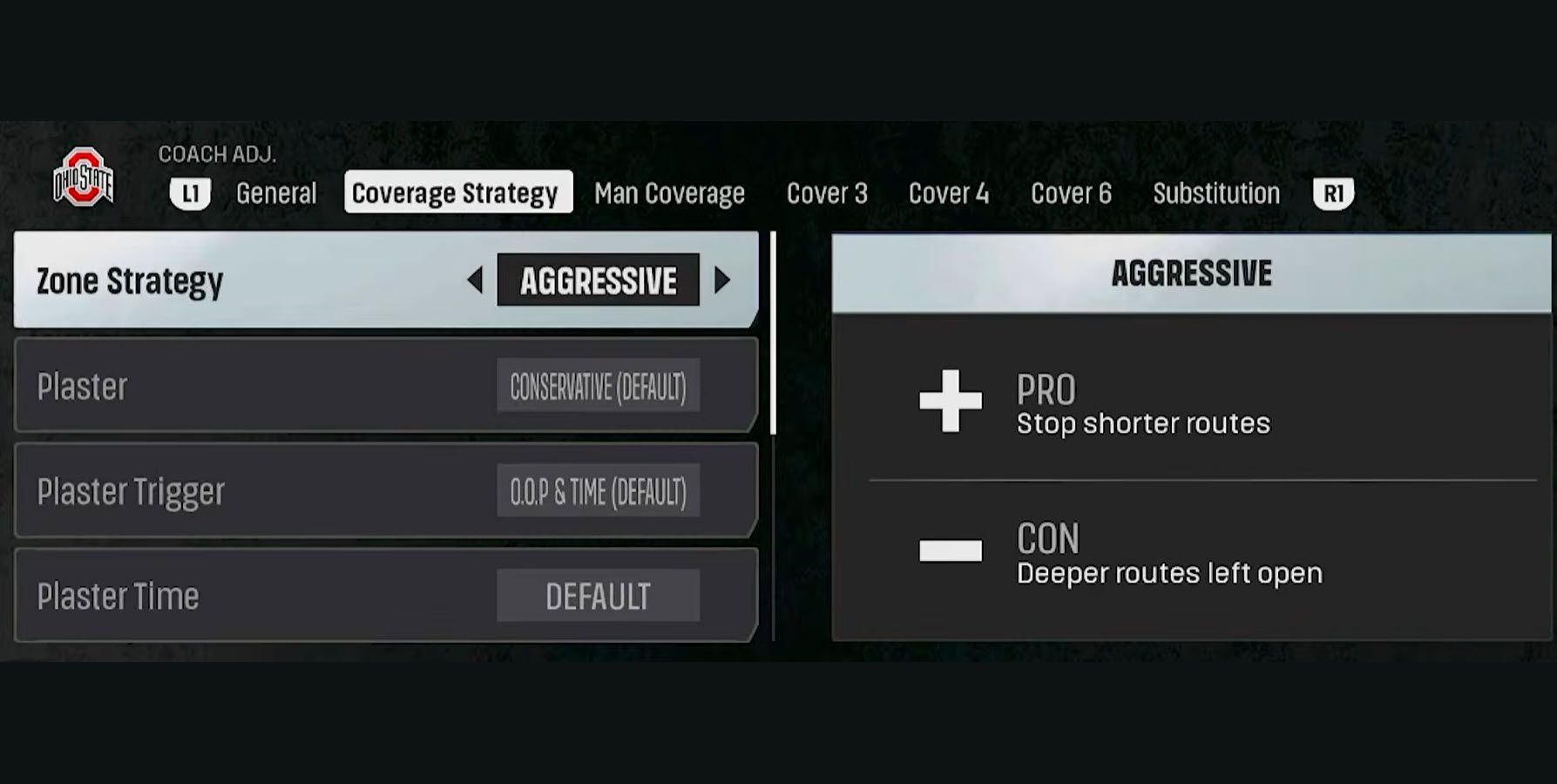
Zone Strategy — Ultra Conservative / Conservative / Default / Aggressive / Ultra Aggressive
- Default: PRO, vision and break opportunities. CON, natural weaknesses in the zones.
- Conservative: PRO, stop deeper routes. CON, short routes are left open.
- Aggressive: PRO, stop shorter routes. CON, deeper routes are left open.
- Ultra Conservative: PRO, stop deeper routes. CON, short routes are left open.
- Ultra Aggressive: PRO, stop ultra-short routes. CON, deeper routes are left open.
Plaster — Conservative (Default) / Aggressive
- Conservative: when triggered, the backside zone defenders (away from the play) abandon their zones and lock onto the nearest receiver man-to-man. Helps prevent easy throws when the QB scrambles away from pressure.
- Aggressive: when triggered, all zone defenders abandon their zones and lock onto the nearest receiver man-to-man. Maximum coverage after the trigger, but it leaves no zone help underneath.
Plaster Trigger — O.O.P & Time (Default) / O.O.P / Time “O.O.P” means Out Of Pocket.
- O.O.P & Time: plaster activates only when both conditions are met, the QB has left the pocket and the plaster timer has expired. The most conservative trigger. Defenders stay in their zones longer.
- O.O.P: plaster activates the moment the QB leaves the pocket (the protected area behind the offensive line), regardless of time.
- Time: plaster activates after a set timer expires, regardless of whether the QB is still in the pocket. Defenders will lock on even against a normal dropback if the play lasts long enough.
Plaster Time — Conservative / Default / Aggressive
- Conservative: plaster waits longer before activating. Defenders stay in their zones longer, giving more time to react to routes before locking on.
- Default: standard plaster timing. Balanced between staying in zone and locking on.
- Aggressive: plaster kicks in earlier in the play. Defenders lock onto receivers sooner after the snap. Good against fast-scrambling QBs.
Roll Coverage — Highest OVR (Default) / Pass Strength / WR1 / WR2 / TE1 / Boundary / Field / Fastest Determines which receiver gets dedicated high-low coverage on the cloud side, Cover 2 side, or two-man side. It activates on plays with “Roll” in the name and rolls the high-low coverage toward your chosen target:
- Highest OVR: the offense’s highest-rated player.
- Pass Strength: the side with more receivers.
- WR1 / WR2 / TE1: a specific receiver.
- Boundary: the short side of the field.
- Field: the wide side of the field.
- Fastest: the offense’s fastest player.
Zone Drops – Flats — Default / 0, 5, 10, 15, 20, 25, 30 yards. Overrides the drop depth for hard flat, cloud flat, and soft squat zones.
Zone Drops – Curls — Default / 0, 5, 10, 15, 20, 25, 30 yards. Overrides the drop depth for curl flat, quarter flat, and seam flat zones.
Zone Drops – Hooks — Default / 0, 5, 10, 15, 20, 25, 30 yards. Overrides the drop depth for hook-area zones.
Note on the zone-drop settings: during pre-play, you can return zone drops to default by using the “Reset Play” audible or the “Sticks” coverage adjustment.
Man Coverage
These checks change how man defenders handle stacked and bunched receivers to avoid getting beaten by rubs and picks.
Man Coverage Check: Stack — Default (Lock) / Combo / Triangle / Combo / Lock
- Lock (Default): each defender locks onto their assigned receiver with no switching or trading. The simplest coverage. Risk: easier for the offense to create picks.
- Combo: when two receivers are stacked one behind the other, the two nearest defenders read the routes and swap. One takes whoever goes inside, the other takes whoever goes outside. Helps prevent easy rub and pick routes.
- Triangle: in Cover 2 Man plays, 3 defenders cover 2 stacked receivers. The cornerback and the adjacent underneath defender play a combo on the two receivers. The safety brackets, taking whichever receiver runs the deeper route or breaks to his side.
- Combo: the inside defender takes the receiver off the ball (behind). The cornerback takes the receiver on the ball (in front) in a stacked alignment. A simple switch that flips who takes which receiver.
Man Coverage Check: Bunch — Default / Point Combo / Point Triangle / Lock
- Point Combo: with receivers grouped tightly (bunched), the defender on the middle receiver (#2) locks on while the other two read routes and swap if needed. One takes inside, one takes outside. Helps handle bunch formations without getting picked.
- Point Triangle: in Cover 2 Man plays, 4 defenders cover 3 bunched receivers. The defenders on #1 and #3 play a combo while the safety brackets, taking whichever receiver runs deeper or breaks to his side.
- Lock: every defender locks onto their assigned receiver through the bunch with no swapping. Simpler, but more vulnerable to pick plays.
Cover 3
These are the man-match rules for Cover 3 against stacks, bunches, and trips. The default value’s behavior is shown after “Currently:” in-game.
3 Match: Stack — Default (Seam) / Zone It / Combo
- Seam (Default): turns on man-match rules. Cornerbacks follow their receiver if the route goes deep enough (past a set depth). The seam defender picks up the #2 receiver if he releases outside or up the seam. Underneath defenders swap responsibilities based on how routes develop.
- Zone It: turns off all matching. Everyone plays straight zone coverage in their assigned area.
- Combo: the seam-flat defender takes the receiver off the ball (behind). The deep-third defender takes the receiver on the ball (in front) in a stacked alignment.
3 Match Check: Bunch — Default (Skate) / Skinny / Skinny Meg / Zone It
- Skate (Default): underneath defenders widen their drops and shift toward the bunch side. Good for taking away flood routes to a bunch.
- Skinny: cornerbacks follow their receiver if the route goes deep. The seam defender picks up #2 going outside or vertical. Hook defenders read the #3 receiver and match on specific routes. Underneath defenders can swap based on how routes develop.
- Skinny Meg: same as Skinny, but the backside cornerback (away from the bunch) skips the depth-trigger read and follows his receiver man-to-man on every route, not just deep ones. Adds tighter coverage on the isolated receiver while running match rules on the bunch side.
- Zone It: turns off all matching. Everyone plays straight zone in their assigned area.
3 Match Check: Trips — Default (Skinny) / Skinny Meg / Zone It
- Skinny (Default): cornerbacks match receivers deep. The trips-side seam defender picks up #2 going outside or vertical. Hook defenders read #3 and match on specific routes. Underneath defenders can swap based on routes.
- Skinny Meg: same as Skinny, but the backside cornerback (away from trips) skips the depth-trigger read and follows his receiver man-to-man on every route, not just deep ones. Tighter coverage on the isolated receiver.
- Zone It: turns off all matching. Everyone plays straight zone in their assigned area.
Cover 4
This is the biggest tab. It covers Quarters match rules and Palms (a 2-read variant) against every formation type. Cover 4 reads the #2 receiver and distributes coverage from there.
Quarters Checks
Quarters Check: Stack — Default (Quarters) / Zone It / Triangle
- Quarters (Default): the cornerback follows the outside receiver (#1) if his route goes deep enough. The safety picks up the inside receiver (#2) if he goes vertical. If #2 breaks to the flat instead, the flat defender takes him and the underneath linebacker looks for the #3 receiver. Defenders swap responsibilities based on how routes develop.
- Zone It: turns off all matching. Everyone plays straight zone in their assigned area.
- Triangle: 3-over-2 coverage. The cornerback and flat defender play a combo on the two stacked receivers. The safety brackets, taking whichever receiver runs the deeper route or breaks to his side.
Quarters Check: Bunch — Default (Box) / Box / Bingo / Point Triangle / Zone It
- Box (Default): each defender owns a direction around the bunch. Cornerback deep outside, safety deep inside, flat defender to the flat, underneath defender short inside.
- Bingo: same as Box, except the outside cornerback gets special treatment. If the outside receiver (#1) stays outside, the cornerback locks onto him man-to-man. If #1 crosses inside, the cornerback falls back to Box rules. Gives you tighter coverage on the #1 receiver.
- Point Triangle: 4-over-3 coverage on the bunch. The flat defender locks the point (#2). The cornerback and underneath defender play a combo on #1 and #3. The safety brackets whichever receiver runs the deeper route or breaks to his side.
- Zone It: turns off all matching. Everyone plays straight zone in their assigned area.
Quarters Check: Trips — Default (Quarters) / Stress / Zone It
- Quarters (Default): cornerback on #1 deep, safety on #2 vertical, flat defender takes #2 to the flat, underneath handles #3. Defenders swap based on routes.
- Stress: if all receivers run vertical (go deep), the deep defenders convert to zone and space out evenly instead of chasing. Against any other route combination, they play normal quarters matching. Good for preventing blown coverage on all-verticals.
- Zone It: turns off all matching. Everyone plays straight zone in their assigned area.
Quarters Check: 1 Rec — Default (Solo) / Solo / Solo Cut / Quarters
- Solo (Default): the weak-side cornerback follows the lone receiver everywhere he goes (man-to-man). The weak-side safety is free to cheat across the field and help on the strong-side #3 receiver. Gives you a free poach player.
- Solo Cut: the weak-side safety takes the lone receiver on short inside-breaking routes (like slants and drags). The weak-side cornerback is free to cheat and help on the strong-side #3 receiver. Flips who plays the lone receiver and who helps.
- Quarters: both the weak-side cornerback and safety play standard man-match Quarters rules on the lone receiver with no one cheating across to help. Balanced, but no free poach player.
Quarters Check: 1 Rec Tight — Default (Solo) / Solo / Solo Cut / Quarters
- Solo (Default): the cornerback follows the tight-aligned lone receiver man-to-man. The safety is free to help on the strong side. Applies when the lone receiver is aligned tight to the formation.
- Solo Cut: the weak-side safety takes short inside-breaking routes from the lone receiver; the cornerback is free to help on the strong side. Applies when the lone receiver is aligned tight to the formation.
- Quarters: both the cornerback and safety play standard Quarters rules on the tight-aligned lone receiver. No poach help.
Palms Checks
Palms is a “2-read” coverage. The cornerback’s job depends on what the #2 receiver does.
Palms Check: Stack — Default (Palms) / Triangle / Zone It
- Palms (Default): the cornerback reads #2. If #2 goes to the flat, the cornerback jumps the flat route while the safety takes #1 deep. If both receivers go vertical, it works just like Quarters, cornerback on #1, safety on #2.
- Triangle: 3-over-2 coverage. The cornerback and flat defender play a combo on the two stacked receivers. The safety brackets, taking whichever receiver runs the deeper route or breaks to his side.
- Zone It: turns off all matching. Everyone plays straight zone in their assigned area.
Palms Check: Bunch — Default (Box) / Box / Bingo / Point Triangle / Zone It
- Box (Default): each defender owns a direction around the bunch. Deep outside, deep inside, flat, short inside.
- Bingo: same as Box, but the outside cornerback gets a special read. If the outside receiver stays outside, the cornerback locks on man-to-man. Otherwise the cornerback falls back to Box rules. Tighter on the #1 receiver.
- Point Triangle: overloads coverage on the bunch with 4 defenders versus 3 receivers. The flat defender locks onto the middle receiver (#2, the “point” of the bunch). The cornerback and underneath defender play a two-on-two combo on #1 and #3. The safety reads the routes and brackets whichever receiver runs the deeper route or breaks to his side.
- Zone It: turns off all matching. Everyone plays straight zone in their assigned area.
Palms Check: Trips — Default (Stubbie) / Stubbie / Zone It
- Stubbie: to the trips side, the cornerback follows #1 everywhere (man-to-man). The nickel, safety, and underneath defender share coverage on #2 and #3 using Palms-style reads. The nickel jumps any quick out route from #2. If #2 and #3 both go deep, the nickel takes #2 vertical and the safety takes #3. Otherwise the safety reads #3 first, then #2.
- Zone It: turns off all matching. Everyone plays straight zone in their assigned area.
Palms Check: 1 Rec — Default (Solo) / Solo / Solo Cut / Quarters
- Solo (Default): the weak-side cornerback follows the lone receiver everywhere (man-to-man). The weak-side safety is free to cheat across and help on the strong-side #3 receiver. Gives you a free poach player.
- Solo Cut: the weak-side safety takes the lone receiver on short inside-breaking routes; the cornerback is free to help on the strong side.
- Quarters: both the weak-side cornerback and safety play standard man-match rules on the lone receiver. Balanced, but no free poach player to help the other side.
Palms Check: 1 Rec Tight — Default (Solo) / Solo / Solo Cut / Quarters
- Solo (Default): the cornerback follows the tight-aligned lone receiver man-to-man. The safety is free to help on the strong side.
- Solo Cut: the weak-side safety takes short inside-breaking routes from the lone receiver; the cornerback is free to help on the strong side. Applies when the lone receiver is aligned tight.
- Quarters: both the cornerback and safety play standard man-match Quarters rules on the tight-aligned lone receiver. No free poach player.
Cover 6
Cover 6 is quarter-quarter-half: it plays Quarters to one side and Cover 2 to the other. These checks adjust the Quarters (match) side against stacks, bunches, and trips.
Cover 6 Check: Stack — Default (Quarters) / Zone It / Triangle
- Quarters (Default): cornerback follows #1 deep, safety matches #2 vertical, flat defender takes #2 to the flat, underneath handles #3.
- Zone It: turns off all matching. Everyone plays straight zone in their assigned area.
- Triangle: 3-over-2 coverage. The cornerback and flat defender play a combo on the two stacked receivers. The safety brackets, taking whichever receiver runs the deeper route or breaks to his side.
Cover 6 Check: Bunch — Default (Box) / Box / Bingo / Point Triangle / Zone It
- Box: against a bunch, the cornerback takes the first deep outside receiver, the safety takes the first deep inside, the flat defender covers the first to the flat, and the underneath defender covers the first short inside. Each defender owns a quadrant around the bunch.
- Bingo: same as Box, but the outside cornerback gets a special read. If the outside receiver stays outside, the cornerback locks onto him man-to-man. Otherwise the cornerback falls back to Box rules. Tighter on the #1 receiver.
- Point Triangle: overloads coverage on the bunch with 4 defenders versus 3 receivers. The flat defender locks onto the middle receiver (#2). The cornerback and underneath defender play a two-on-two combo on #1 and #3. The safety brackets whichever receiver runs deeper or breaks to his side.
- Zone It: turns off all matching. Everyone plays straight zone in their assigned area.
Cover 6 Check: Trips — Default (Stubbie) / Stubbie / Zone It
- Stubbie: to the trips side, the cornerback follows #1 everywhere (man-to-man). The nickel, safety, and underneath defender share coverage on #2 and #3. The nickel jumps any quick out route. If #2 and #3 both go deep, the nickel takes #2 and the safety takes #3. Otherwise the safety reads #3 first, then #2.
- Zone It: turns off all matching. Everyone plays straight zone in their assigned area.